
Table of Contents
ToggleWhen comparing local traditional web hosting companies to international managed WordPress hosts like SiteGround or WP Engine, the differences in security posture are significant and worth analyzing carefully.
The gap is not just about technology, but also about investment, scale, and philosophy in how security is managed.
Overview

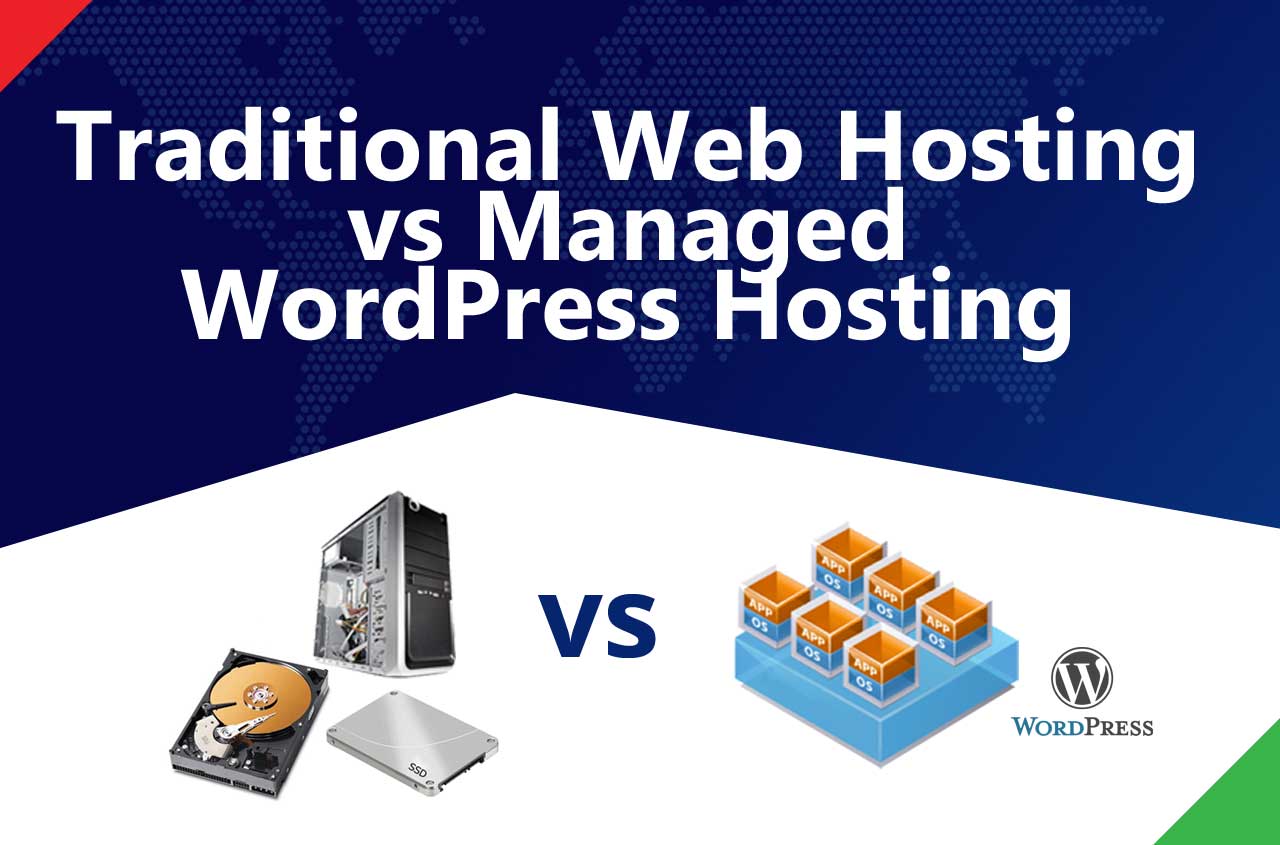
- Traditional Web Hosting - This is the slowest and cheapest as it uses older type of mechanical rotating hard disk to read data. The server is a physical computer located in a data center. Suitable for startups, personal blog, one page and simple websites.
- Modern Web Hosting - This is faster because it uses new hard disk that do not have rotating needle to read data. Suitable for small, local businesses and communities.
- High Performance Cloud Hosting - This give the fastest performance because not only it uses new hard disk, its entire computer and network is virtually optimized using global cloud providers like Amazon Web Services (AWS) or Google Cloud Platform (GCP). This is highly recommended for Medium to large organization with nationwide or regional presence.
1. Infrastructure & Investment in Security
- Traditional Web Hosting
Smaller hosting providers often rely on shared hosting models where multiple websites reside on the same server. Security investment is typically limited — they may apply operating system patches, basic firewalls, and antivirus software, but advanced security layers are rare.
Some smaller providers depend heavily on third-party control panels (like cPanel or Plesk) for security settings, which can be outdated if not managed actively. Budget constraints also mean they may lack dedicated security teams or 24/7 monitoring. - High Performance Managed Hosts (SiteGround, WP Engine)
These companies run on premium infrastructure (Google Cloud, AWS) and have large in-house security teams. They invest in containerized environments, auto-scaling servers, and proprietary firewall rules tailored to WordPress exploits.Their approach is proactive: they often identify vulnerabilities in WordPress or plugins early and push virtual patches at the hosting level before the wider community even updates.
2. Server-Level Security
- Local Hosts
Security at the server level is often generic. A traditional host may keep servers patched, but they rarely apply fine-tuned rules for WordPress specifically. Account isolation may not be robust, meaning if one customer’s site is compromised, others on the same server could also be affected.
Monitoring tools for intrusion detection and prevention (IDS/IPS) may be basic, or outsourced to cheaper solutions. - SiteGround / WP Engine
Both enforce strict account isolation and advanced kernel-level security. SiteGround applies custom Linux containers to keep accounts separate, while WP Engine has built-in disk write protections to stop unauthorized file changes. Both constantly monitor for malware, suspicious logins, and brute-force attempts, with automated blocking in real time.
3. Application-Level Protection (WordPress Specific)
- Local Hosts
Traditional providers usually don’t specialize in WordPress. Security at the application level is left entirely to the customer — you’re responsible for installing security plugins (Wordfence, iThemes, etc.), configuring them, and keeping them updated. Without expertise, many users leave gaps such as outdated plugins, weak passwords, or unsecured login pages. - Managed Hosts
SiteGround provides a Security Optimizer plugin, while WP Engine enforces plugin disallow lists, automatically blocks dangerous scripts, and provides Global Edge Security for enterprise plans (a managed WAF + DDoS mitigation). They combine automation with manual oversight, meaning they don’t just leave the application exposed to user error.
4. DDoS and Large-Scale Attacks
- Local Hosts
Most smaller companies rely on basic upstream protection from their datacenter or ISP. A large-scale DDoS attack can overwhelm their network, leading to downtime not just for your site but for hundreds of customers hosted on the same shared server. - International Hosts
SiteGround integrates hardware and software-level DDoS mitigation with Google Cloud’s backbone, while WP Engine’s Global Edge Security adds enterprise-grade protection. They also have the scale to absorb heavy traffic spikes and reroute traffic without downtime.
5. Monitoring & Support
- Local Hosts
Support teams in smaller hosting companies are often generalists handling billing, setup, and basic troubleshooting. 24/7 monitoring may not be comprehensive, and incident response can be delayed or dependent on office hours. - Managed Hosts
SiteGround and WP Engine both have 24/7 security teams with automated alerting systems. Their monitoring is continuous, often identifying vulnerabilities before they are exploited. When issues occur, you can escalate to specialized support teams who are familiar with WordPress security at a very deep level.
Why “traditional web hosting” can have weaker security
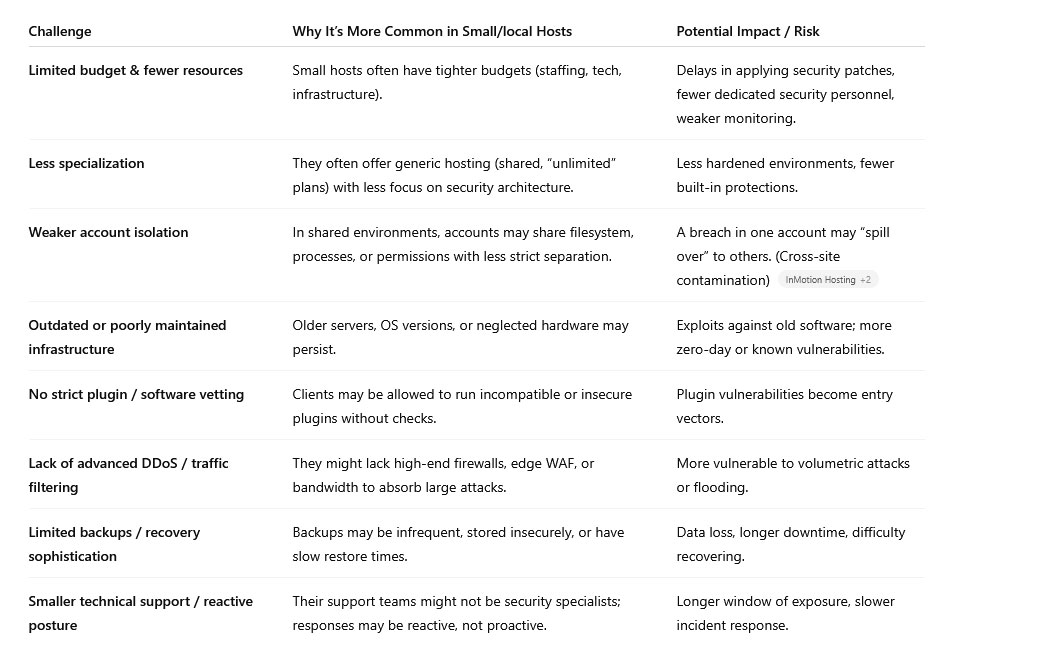
How they compare against SiteGround / WP Engine (or equivalent managed hosts)
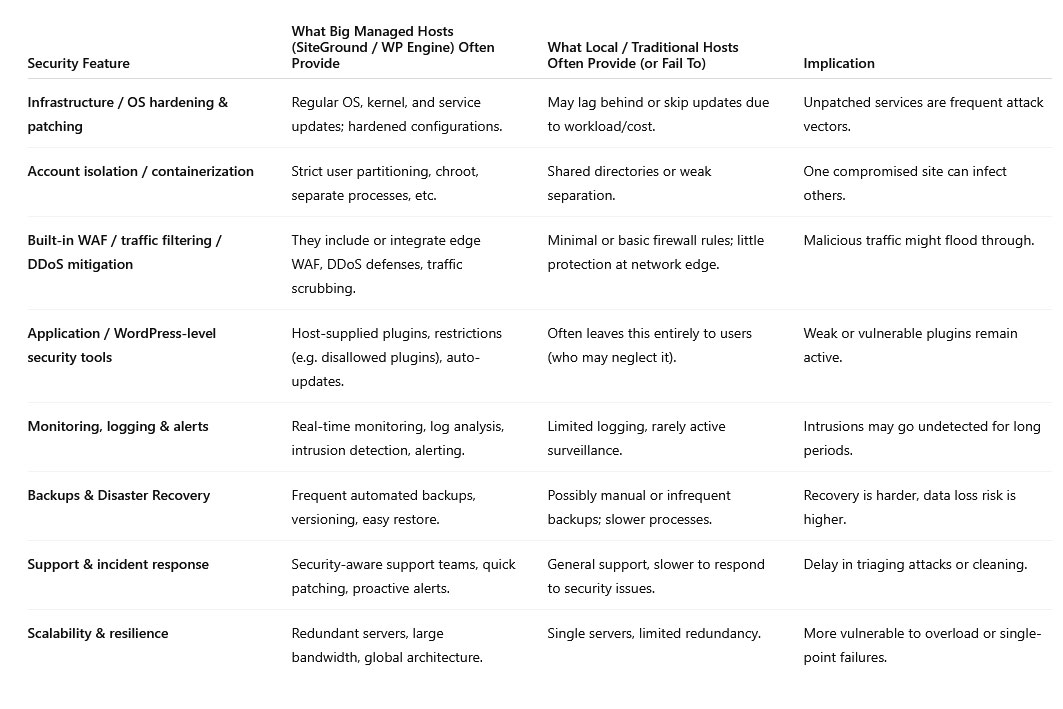
Because managed hosts specialize in WordPress/hosting infrastructure, they can invest heavily in these security features and amortize their cost over many customers. Small hosts may have to pick which features to prioritize.
Risks & dangers you should watch out for if you use a local/traditional host
- Cross-account infection: If one client on the server is compromised, the attacker may pivot to your site.
- Slow patch cycles: Delays in applying patches to OS, server software, or libraries.
- Zero-day exploit exposure: Without layered defenses (e.g. WAF), you are more vulnerable to new attacks.
- Poor backup / restore practices: If backups are infrequent or inconsistent, recovery is painful.
- Weak configurations / default settings: Missing hardening (e.g. open directory listing, default passwords).
- Inadequate logging / visibility: You might not even notice that your site is compromised.
- Plugin vulnerabilities: With little oversight or restrictions, users may install code that has holes.
- Resource limitations: High traffic or attacks can overwhelm small hosts more easily.
- Support limitations / delays: The host might not treat security incidents as a priority, leading to prolonged downtime or damage.
When a traditional web hosting can be acceptable (if done right)
Using a smaller/local host isn’t always a bad decision — if they meet certain security minimums and you augment with additional measures. Here are what to look for / demand from them:
- Strong account isolation / containerization
- Regular OS / kernel / software patching
- Basic firewall + network protections
- Support for SSL, HTTPs, and secure protocols
- Backups (daily, offsite) and tested restore mechanisms
- Monitoring and intrusion detection / logging
- Restrictions or guidance on insecure plugins / code
- Good support response, security awareness
- Willingness to integrate or allow WAF / external security tools
If those are in place, and you supplement with layers you control (e.g. Sucuri, WAF, strong dev practices), then a local host can still work — especially for lower-risk sites.
Bottom Line & Recommendation
- If you’re running a personal blog or small brochure site, a local host may be sufficient, provided you install your own security plugins and keep everything updated.
- Security risks are higher with smaller, local hosts, because they often lack the resources, scale, and specialization to provide the depth of defenses that managed hosts offer.
- But that doesn’t mean they’re unusable — if they meet key security standards and you layer extra protection (WAF, scanning, good dev practices), you can reduce risk substantially. Their cost is also cheaper than Siteground or WP Engine.
- For high-value sites (e.g. international trade that is prone to attack and phishing, e-commerce, membership, high traffic, portals), it’s safer to go with a managed host (SiteGround, WP Engine, or similar) or at least insist on a host that meets strong security criteria.
- Adding a cloud WAF provider like Sucuri on top of any host can create a stronger “defense in depth,” especially if you’re stuck with a smaller local provider.
If your site represents serious business value, the security benefits of international managed hosting far outweigh the savings of cheaper traditional hosting.